Install, connect, and use Freebuild in Pi.
The Pi extension registers the Freebuild provider, connects a license, selects DeepSeek V4.1 Flash 1017, and shows the same sponsor panel as OpenCode.
Install
pi install npm:@freebuild/pi@latestRestart Pi so the extension loads.
For a local checkout of this repository:
pi install "$(pwd)/pi-extension"Connect a license
Inside Pi, run:
/freebuild-licenseChoose where to pay
Pick Buy a new license to open checkout, or I already have a key if you bought in the browser.
You should see: the activation page opens in your browser. Keep the Pi window open.
Verify your email
Enter the email that should own the license. Click Send code, then enter the 6-digit code and click Verify email.
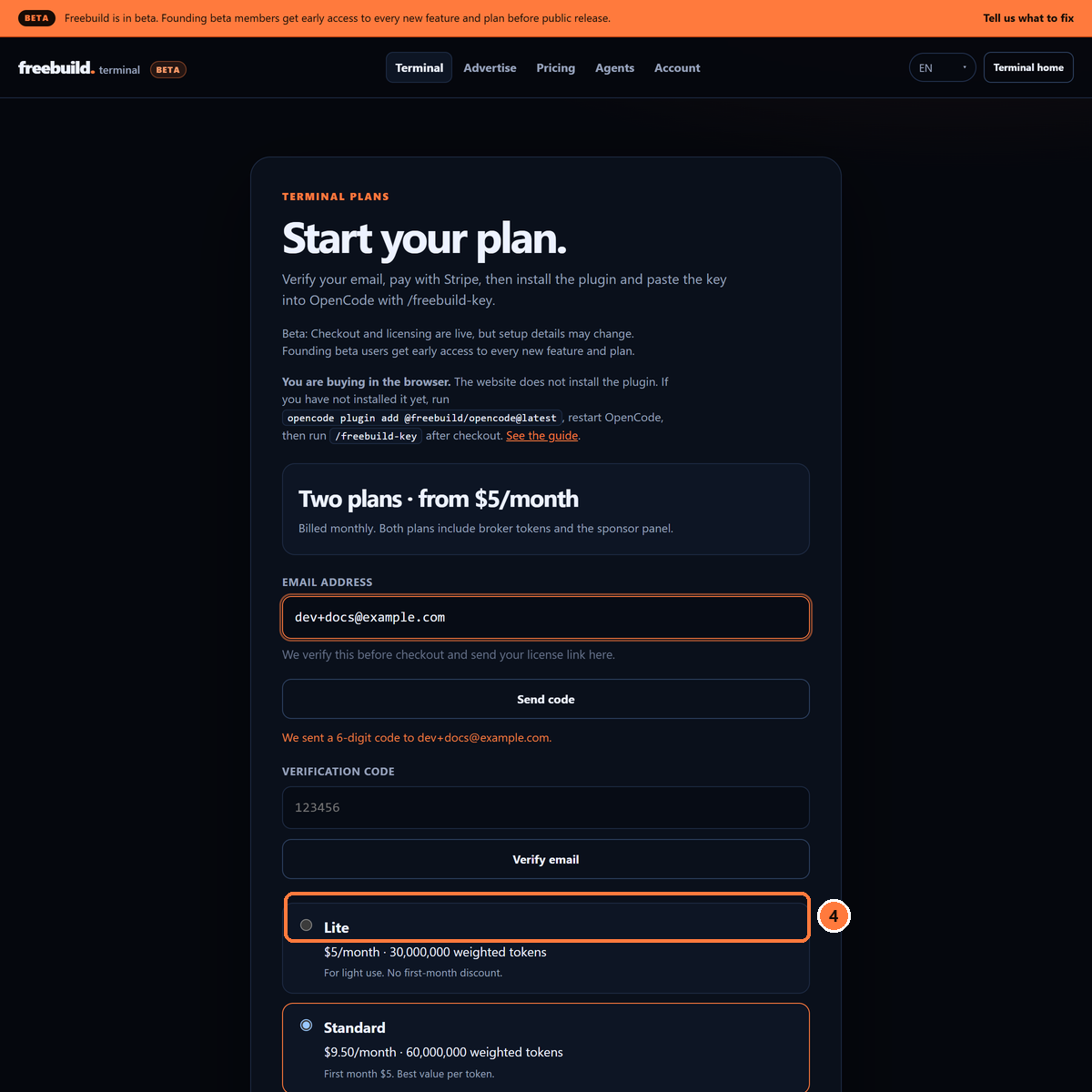
You should see: Email verified. Continue to checkout.
Choose a plan and pay
Lite is $5/month for 30M weighted tokens. Standard is $9.50/month for 60M, first month $5. The sponsor panel is included in both.
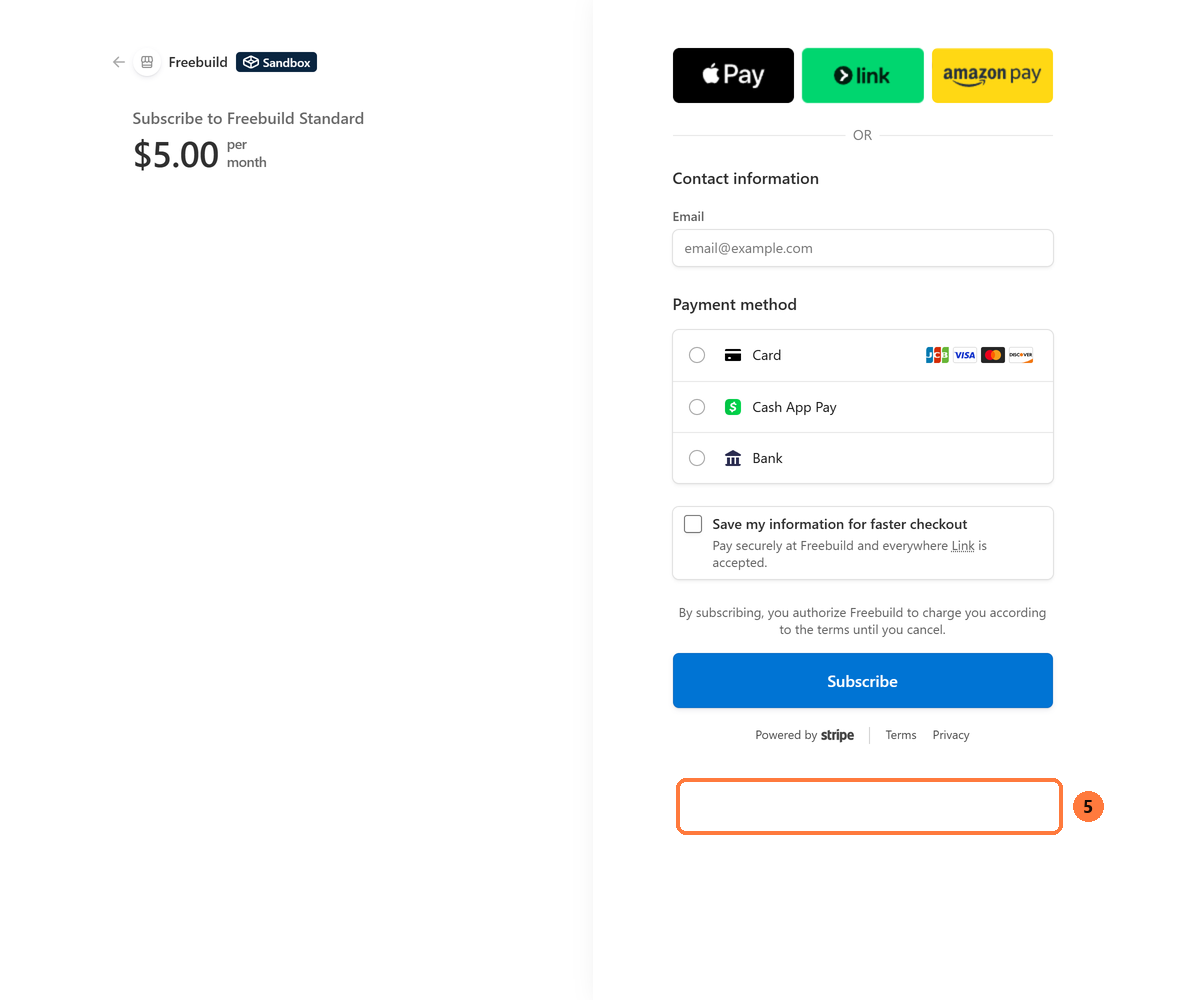
You should see: the plan name, the first-month total, and the Freebuild terms line.
Return to Pi
The extension polls the activation. When checkout finishes, it saves the key, registers the provider, and selects the Freebuild model.
You should see: License connected. Freebuild model selected.
Buy in the browser
Buy on the pricing page, then paste the key in Pi:
/freebuild-keyYou can also pass the key directly:
/freebuild-license fb_...The extension verifies the key against the broker, saves it to ~/.config/freebuild/credentials.json, and selects DeepSeek V4.1 Flash 1017.
Use the model
/modelChoose:
freebuild/deepseek-flashActivation writes defaultProvider: "freebuild" and defaultModel: "deepseek-flash" to your Pi settings so new sessions start on the sponsored model. If you already set a different provider as your default, the extension leaves it alone unless you run /freebuild-setup.
Verify the connection:
/freebuild-plan/freebuild-plan shows the plan label, weighted used and limit, raw tokens, cache hit rate, and reservations. The billing period is on /account.
Sponsor panel
The panel appears above the editor while a sponsored run is active. On terminals at least 80 columns wide it uses a large wordmark, an image when the campaign has one, and a capped copy block. Narrow terminals fall back to the compact panel.
Click the panel body to open the sponsor, or use alt+o:
/freebuild-sponsorClicking uses the campaign currently drawn in the panel, so the brand and the destination always match. The loading and error panels are not clickable. In Pi's regular TUI mode the terminal owns the mouse; use alt+o there.
Preview the campaign before a run:
/freebuild-adtestThe preview stores the campaign on the server. The next sponsored run consumes the same campaign, so the preview and the live panel match.
Print and JSON modes do not render the panel and do not record impressions.
Commands
| Command | What it does |
|---|---|
/freebuild-license | Connect, reconnect, replace, or buy a license. |
/freebuild-key | Paste a license key you bought in the browser. |
/freebuild-founding | Redeem a private founding beta code. |
/freebuild-setup | Repair the provider and default model. |
/freebuild-plan | Show plan and usage. |
/freebuild-billing | Open the Stripe billing portal. |
/freebuild-sponsor | Open the current sponsor. |
/freebuild-adtest | Preview the sponsor panel for 4 seconds. |
/freebuild-update | Check for a new version and open this guide. |
/freebuild-status | Show license, plan, model, install, and broker. |
Troubleshooting
| Message | What it means | What to do |
|---|---|---|
install_mismatch | The license is bound to a different install. | Close every Pi window, reopen, then run /freebuild-plan. If it still fails, paste the current key with /freebuild-key. |
Freebuild missing from /model | The provider is not registered. | Run /freebuild-setup, then restart Pi. |
401 or invalid license | The key was revoked, rotated, or the subscription is inactive. | Get the current key from /account and paste it with /freebuild-key. |
email_not_verified | Checkout was started before the email code was verified. | Go back to the activation page, verify the email, then continue to checkout. |
code_used | The founding code was already claimed. | Use the license email or /freebuild-key. Do not start a second checkout. |
| Panel does not open on click | Pi is in regular TUI mode, or the terminal does not report mouse events. | Use alt+o or /freebuild-sponsor. |
| Broker unreachable | Pi cannot reach the broker. | Check your network, then retry. The sponsor panel also needs broker access. |
Next
Read the full documentation for token weighting, billing, and the OpenCode command list. Compare plans on the pricing page.